DLL 延时加载与生成导入库
版权声明:署名-非商业性使用-相同方式共享
@@ Tags: win32;dll;延时加载
@@ Date: 2021-8-22
导入库原理
- 导入库是由
dll、exe工程生成 (必须包含至少一个导出符号)。 - 导入库经过 连接器 连接生成二进制文件后, 会在目标二进制文件中添加 导入段。
- 运行执行文件时 加载程序 根据 导入段 中的 DLL名称 与 导入符号 来加载动态库,并载入导入符号。
即:将该符号的 相对虚拟地址 + DLL基址(映射到进程地址空间的虚拟地址)计算出实际符号的虚拟地址,后存储至导入段。
通过 DLL 生成导入库
在很多时候,我们会在没有头文件、导入库的情况下使用某些私有DLL,如果不想使用 LoadLibrary()、GetProcAddress() 不妨看看这个办法。
它可以使我们从动态库中提取所有的导出符号来制作 .lib 的导入库,然后搭配自制的 .h 文件,解锁 隐式链接 DLL。
- 制作
.def文件
# CoreFoundation.dll
dumpbin /exports CoreFoundation.dll > CoreFoundation.txt
echo LIBRARY COREFOUNDATION > CoreFoundation.def
echo EXPORTS >> CoreFoundation.def
for /f "skip=19 tokens=4" %A in (CoreFoundation.txt) do echo %A >> CoreFoundation.def

# MobileDevice.dll
dumpbin /exports MobileDevice.dll > MobileDevice.txt
echo LIBRARY MOBILEDEVICE > MobileDevice.def
echo EXPORTS >> MobileDevice.def
for /f "skip=19 tokens=4" %A in (MobileDevice.txt) do echo %A >> MobileDevice.def
- 通过
.def生成.lib导入库
lib /def:CoreFoundation.def /out:CoreFoundation.lib /machine:x86
lib /def:MobileDevice.def /out:MobileDevice.lib /machine:x86

lib /def:CoreFoundation.def /out:CoreFoundation.lib /machine:x64
lib /def:MobileDevice.def /out:MobileDevice.lib /machine:x64
if your DLL is 64 bit, you may use /machine:x64 or /machine:x86-64 depending on your environment setup.
https://stackoverflow.com/questions/9946322/how-to-generate-an-import-library-lib-file-from-a-dll
延时加载
延时加载主要可以解决两个问题:
- 减少启动时间, 降低资源占用
- 传统的DLL加载方式会在程序启动时立即加载所有依赖的DLL,这可能导致程序启动时间变长。
- 不是所有DLL都在程序运行期间始终被需要。通过延时加载,可以在实际需要时再加载它,从而更有效地利用系统资源。
- 应用程序可以自行决定加载路径
- 在程序运行前,并不知道所依赖的DLL是否可用,或者需要根据程序的运行环境来确定加载哪个版本的DLL。
在 MSVC 系列编译器中启用延时加载需要指定连接器选项: /DELAYLOAD:"CoreFoundation.dll"(连接器->输入)。
注意: 延迟加载 不支持导出字段(如 全局变量、常量等)。
下面是延时加载的异常处理示例:
int main()
{
    __try
    {
        CFArrayGetTypeID(); // 首次调用 DLL 中导出函数时将触发DLL加载
    }
    __except (DelayLoadDllExceptionFilter(GetExceptionInformation()))
    {
        // Nothing
    }
}

LONG WINAPI DelayLoadDllExceptionFilter(PEXCEPTION_POINTERS pep)
{
    PDelayLoadInfo pdli = PDelayLoadInfo(pep->ExceptionRecord->ExceptionInformation[0]);

    switch (pep->ExceptionRecord->ExceptionCode)
    {
    case VcppException(ERROR_SEVERITY_ERROR, ERROR_MOD_NOT_FOUND): // 找不到指定的DLL模块
        printf("Dll not found: %s", pdli->szDll);
        break;

    case VcppException(ERROR_SEVERITY_ERROR, ERROR_PROC_NOT_FOUND): // 在DLL模块中找不到指定的函数
        if (pdli->dlp.fImportByName) // 名称导入
        {
            printf("Function %s was not found in %s",pdli->dlp.szProcName, pdli->szDll);
        }
        else  //序号导入
        {
            printf("Function ordinal %d was not found in %s",pdli->dlp.dwOrdinal, pdli->szDll);
        }
        break;
    }

    return EXCEPTION_EXECUTE_HANDLER;    // 已处理, 程序恢复执行
    return EXCEPTION_CONTINUE_SEARCH     // 抛到上一层处理
    return EXCEPTION_CONTINUE_EXECUTION; // 执行下一个异常
}
卸载延时加载的DLL
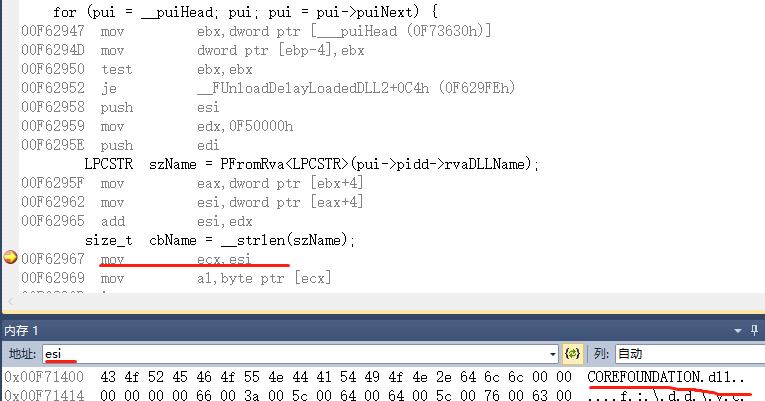
要启用卸载延时加载功能必须指定连接器选项: /DELAY:UNLOAD (连接器->高级)。
调用函数: __FUnloadDelayLoadedDLL2(dllname), 它位于头文件: delayimp.h。
使用该函数时要注意, dllname 可能与目标dll的名称不一致, 该名称与 .def 中的 LIBRARY 后面的名称 一致。
这可以调试跟踪到函数内部, 由于优化的原因我们已经看不到了, 所以只能在返汇编中跟踪查看:
改变DLL搜索路径
@@ Tags: 动态库;搜索顺序;加载顺序
@@ Refer: 《WINDOWS 核心编程》第19章: DLL基础.运行可执行模块
默认情况下 Windows的DLL搜索顺序如下:
- 包含可执行文件的目录。
- Windows的系统目录,该目录可以通过
GetSystemDirectory()得到。 - 16位的系统目录,即 Windows 目录中的 System 子目录。
- Windows目录,该目录可以通过
GetWindowsDirectory()得到。 - 进程的当前目录。
PATH环境变量中所列出的目录。
影响搜索顺序的因素
略,参考:
https://docs.microsoft.com/en-us/windows/win32/dlls/dynamic-link-library-search-order
SetDllDirectory()
该函数会对影响 所有子进程 的 LoadLibrary()、LoadLibraryEx() 及延时加载DLL的操作, 并且会禁用 "安全DLL搜索模式", 当指定目录在搜索路径中时.
After calling SetDllDirectory, the standard DLL search path is:
- The directory from which the application loaded.
- The directory specified by the lpPathName parameter.
- The system directory. Use the GetSystemDirectory function to get the path of this directory. The name of this directory is System32.
- The 16-bit system directory. There is no function that obtains the path of this directory, but it is searched. The name of this directory is System.
- The Windows directory. Use the GetWindowsDirectory function to get the path of this directory.
- The directories that are listed in the PATH environment variable.
但需要注意的是
如果路径中包含分号将导致函数失效, 此时函数将返回 0。
https://stackoverflow.com/questions/25740645/setdlldirectory-fails-with-some-unicode-symbols/25741240#25741240如果执行成功后, 不重置搜索路径, 则将影响所有子进程, 直到进程退出。
通过调用SetDllDirectory(NULL)重置搜索路径。子进程会继承父进程的
当前工作目录,因此也会影响搜索路径。
注册表方式
Each application can now store it own path the registry under the following key:
HKEY_LOCAL_MACHINE\SOFTWARE\Microsoft\Windows\CurrentVersion\App Paths
The use the application path, set a key for your application, using ONE.EXE from the example above:
HKEY_LOCAL_MACHINE...\CurrentVersion\App Paths\ONE.exe
Set the (Default) value to the full path of your executable, for example:
C:\Program Files\ONE\ONE.exe
Add a sub-key named Path
Comments ()